 Note: The Output files will only be created when RG390 is run in Update mode (i.e. the only parameter to the report is entered as ‘Y’).
Processing
The transfer of data from aPay to Cornerstone on Demand is completed in two stages.
RG390 Cornerstone Report (File Extract)
The transfer of data from aPay to Cornerstone on Demand is initiated via program RG390 Cornerstone Report. When executed the program will read the parameters defined in the CST_DEFs, associated Codes and Code rules and generate the Output files.
Note: The Output files will only be created when RG390 is run in Update mode (i.e. the only parameter to the report is entered as ‘Y’).
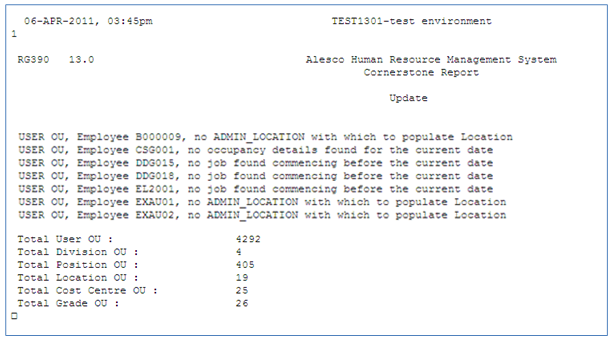
An RG390 report will be produced each time the RG390 program is executed. The report shows the total number of records produced for each output file and any exception messages that have stopped employees being included in the extract. When first implementing the Cornerstone Interface, please be sure to check the results reported in this report.
 Execute the RG390 Cornerstone Report
1. Go to Cornerstone Interface folder (9300).
2. Select RG390 Cornerstone Report.
3. FF993 Report Parameters Screen will appear.
Enter ‘N’ to run in Non Update (i.e. only report with totals and exception messages produced) or
enter ‘Y’ to run in Update mode (i.e. report and extract files produced).
4. FA962 Report Options will appear.
Select the desired report options and click Launch Report.
When RG390 is run in Update mode the six interface text files will be available both in the standard aPay Output directory on the aPay Application Server and the External Load directory on the aPay Database server. The standard SFTP Transfer process (HI001) will use the extract files located in the aPay Output directory.
RG390 can be executed on a once off basis or scheduled on a recurring basis. For the latter option, step 4 above allows scheduling of a report to run periodically by selecting the Schedule Recurring option from FA962 Report Options.
HI001 Cornerstone FTP File Transfer Script
The FTP File Transfer script (HI001) will be automatically submitted when
· The SFTP Platform field on the Transfer tab of FD130 Cornerstone Control Panel is populated
· RG390 completes successfully
This process will use the program specified in the SFTP Path/CMD field on the Transfer tab of FD130 to communicate directly with the Cornerstone on Demand FTP server using a SFTP protocol. On completion of the transfer, the CSOD FTP server is checked for existence of the extract files to ensure there has been a successful transfer. If not, the email address flagged in the SFTP Email field on the Transfer tab of FD130 will be notified.
The Cornerstone FTP File Transfer currently supports the following platforms / products
· Windows based server using SFTP software package
· Oracle Enterprise Linux using provided SFTP
· Windows based server using WinSCP software package
· Solaris based servers using provided SFTP
For Linux/Unix environments, it is important to ensure that the HI001 script has been installed with appropriate execute permissions (i.e. file permissions should be something like rwxr-xr-x).